
Create & send transport orders digitally
From every tour in CargoWiz one click produces a complete transport order for your carrier – generated as a PDF and sent straight by email. Goodbye Word templates and copy-paste.
Documents come straight back: the upload portal
CargoWiz can print an upload link on every transport order automatically – one per tour. Your carrier opens it, sees the stops of the tour and uploads documents such as delivery notes or pallet receipts straight from phone or PC. No CargoWiz login, no registration, in several languages.
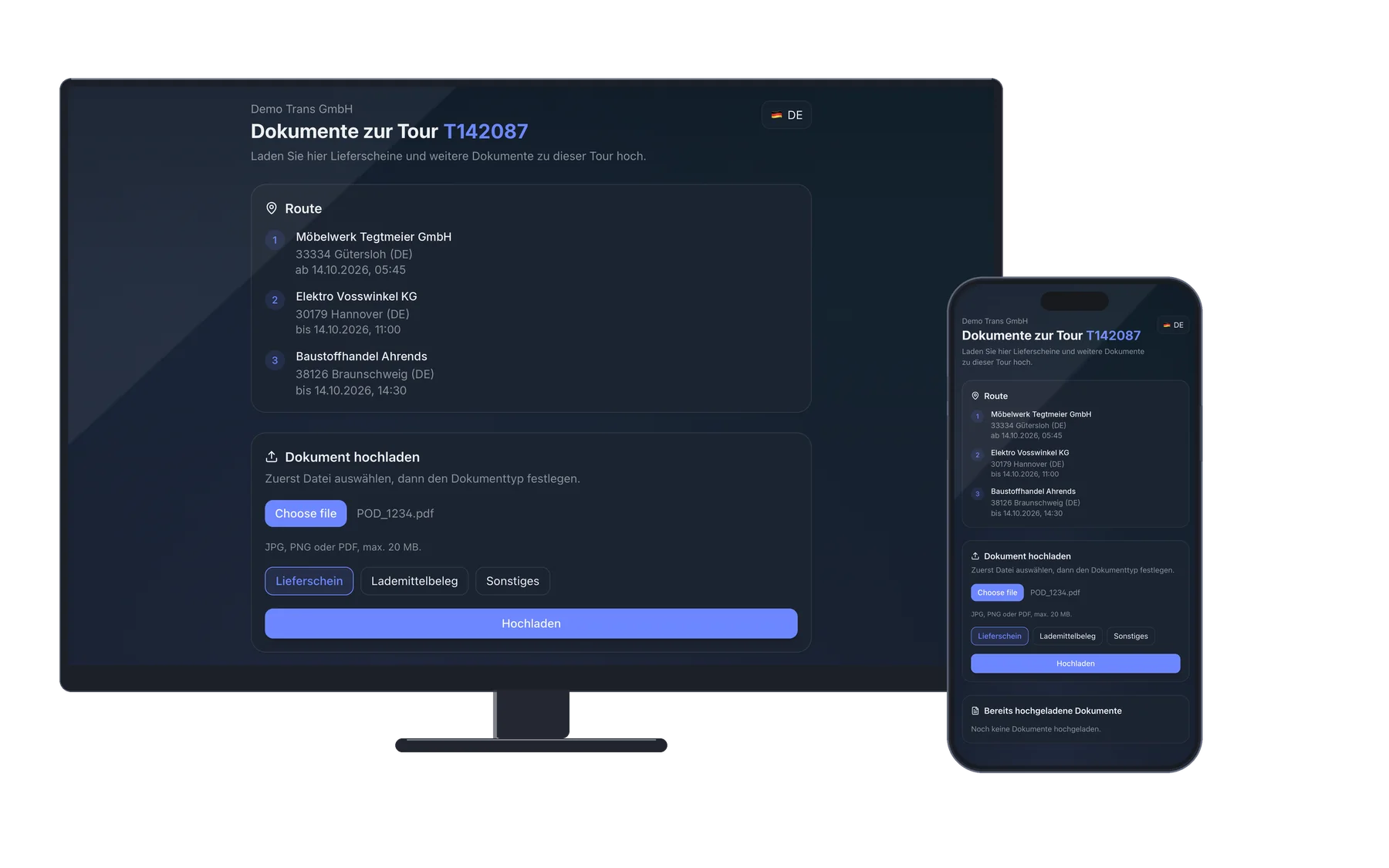
Straight into your inbox
Every uploaded document lands in your inbox – with who uploaded it and which tour it belongs to. When you assign it, CargoWiz suggests the matching orders of that tour right away.
Secure, without effort
Each link is valid for exactly one tour and one carrier. If the assignment changes or the tour is invoiced, it becomes invalid automatically.
For your own drivers too
You can also create the link yourself in dispatch – for example for one of your own drivers who is on the road without the app.
Carrier orders bouncing between Word, PDF and email
Any freight forwarder working with subcontractors knows the pain: every tour that goes to a carrier needs its own transport order. Today that usually means opening a Word template, copying data out of the TMS, adjusting the conditions, saving the whole thing as a PDF and sending it by email. It eats up a lot of time – and errors creep in at every step. The carrier asks back because an address is missing, the dispatcher sends the tour to the wrong subcontractor, or the conditions on the order don't match the invoice.
Create a carrier order with one click
CargoWiz turns every tour into a complete carrier order with one click – even when the tour bundles several customer orders. Master data, loading and unloading sites, time slots, shipment data and conditions are pulled in automatically. A customisable template makes sure the layout and content fit your company. The order is generated as a PDF and sent straight from CargoWiz to the carrier by email. The conditions are documented unambiguously, so there's nothing to argue about when the carrier's invoice arrives. Beyond the transport order, CargoWiz also generates CMR consignment notes, forwarder's certificates (Spediteurbescheinigungen), forwarding orders (Speditionsaufträge) and the driver's daily schedule – all with a single click straight from the tour data, with the tour times already pre-filled. And the way back is just as short: via the printed upload link, the carrier sends their documents straight into your inbox.
What you get out of it
One click instead of a Word template – carrier orders in seconds, not minutes.
Customisable template – the layout and content fit your company.
One tour, one transport order – even when several customer orders are bundled together.
Not just transport orders: CMRs, forwarder's certificates, forwarding orders and the driver's daily schedule – with a single click.
From order to sent carrier order in three steps
Pick the tour in CargoWiz and assign a carrier.
Data from the tour is pulled into the template automatically – adjust if needed.
Generate the PDF and send it straight to the carrier by email.
Related topics
Carrier orders in seconds, not minutes
In a live demo we'll show you how quickly you can hand transport orders to your carriers – generated from every tour in seconds.